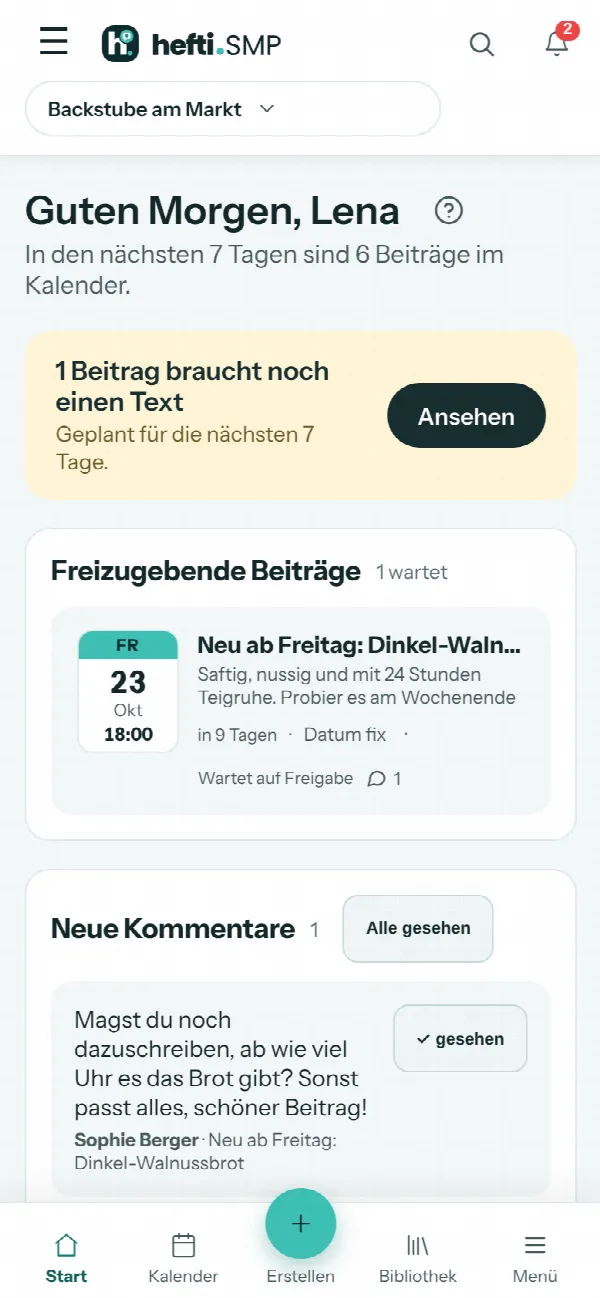
You have known for a long time that you should post.

But when,
exactly?

Between customers, offers and the end of the day, social media usually gets just one thing: a guilty conscience.

Sound familiar?

It is not your fault. Really.

  • It is 10 pm and you are still looking for an idea for tomorrow.
  • A hundred nice photos sit on your phone, but there is no time for the captions.
  • For a few weeks it goes great, then it goes quiet again.
  • And really you want just one thing: for the right people to see you.

It is not a lack of skill. Social media simply used to be manual work, every single day. From today, the planner takes exactly this work off your hands.

Self-employed woman sitting tired at the kitchen table late at night in front of her laptop
10:47 pm.And tomorrow the same question again.
The cyclealmost everyone knows
Week 1
Motivated, a post every day
Week 3
Lots to do, radio silence
Week 6
It gets quieter, fewer enquiries
Panic
Quickly post anything
How you get out

The cycle breaks when it keeps going without you.

The answer is not more discipline, but a plan that holds even when you have no time.

  • Planned ahead: Your posts are ready weeks in advance.
  • A steady rhythm: Visible every week, instead of panic every few months.
  • You stay in control: You see what is working and decide for yourself.
See it for yourself

What it feels like when content just flows.

👉 Tap the film and it plays from the start with sound.

Watch with sound
How it works

Three steps. The rest runs itself.

No technical know-how, no training. If you can write a WhatsApp message, you can do this.

1

Tell us a little about you

A few simple questions. The planner remembers your voice, your topics and who you want to reach.

about 3 minutes
2

Say yes to your posts

You get ready-made suggestions with caption, image and hashtags. Take them as they are, or change whatever you like.

a month in one afternoon
3

Lean back

Your posts go out by themselves at the best time. And you see in plain words what landed well.

visible every week
A look inside

Everything you need for social media. In one place.

No more five different tools, no sticky notes, no phone reminders. See for yourself:

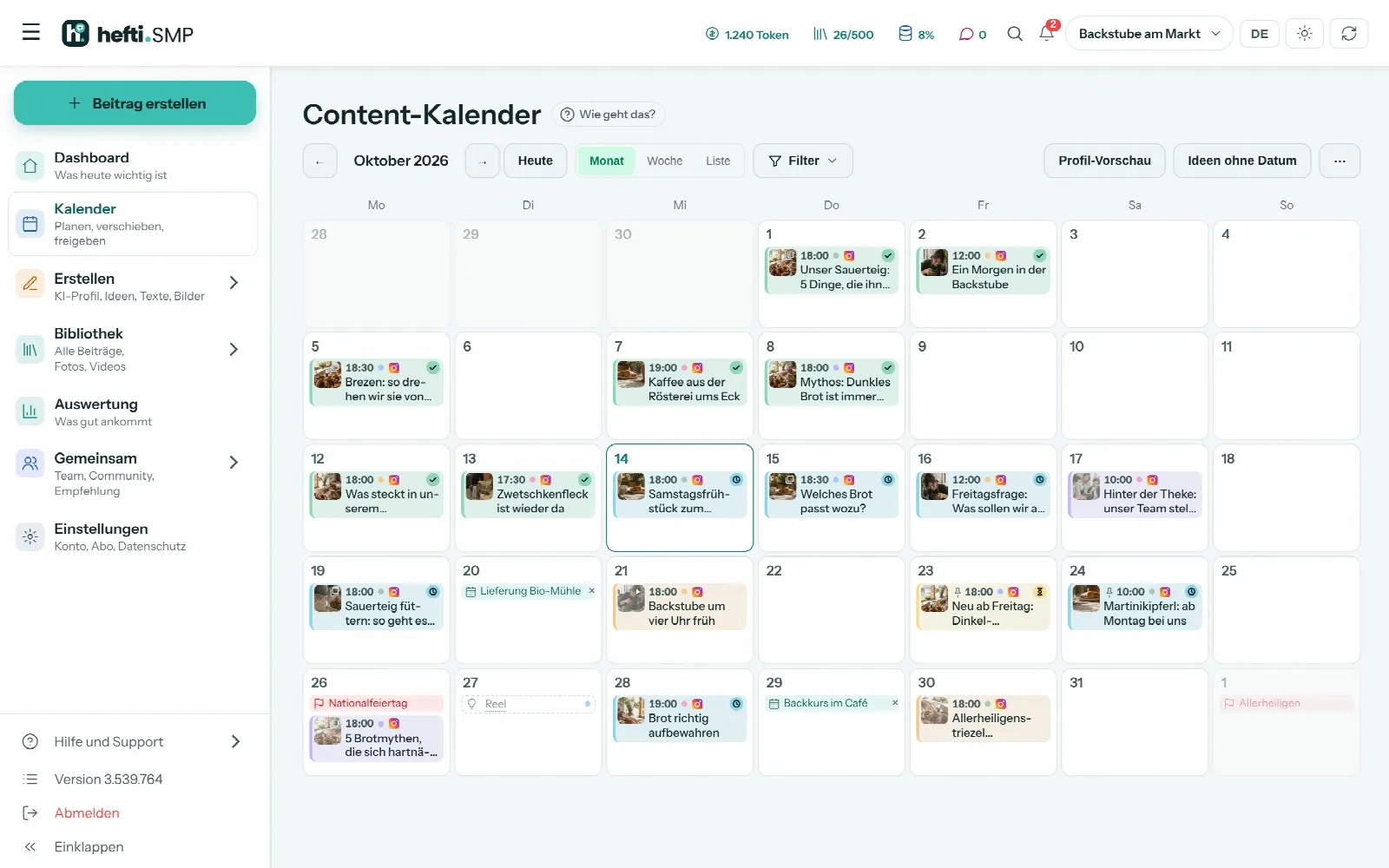
A whole month. At a glance.

You see right away what goes out when. And feel how calm it gets when everything has its place.

  • The month planner fills your calendar with fitting ideas
  • Move posts with your mouse or finger
  • Fixed dates stay where they are
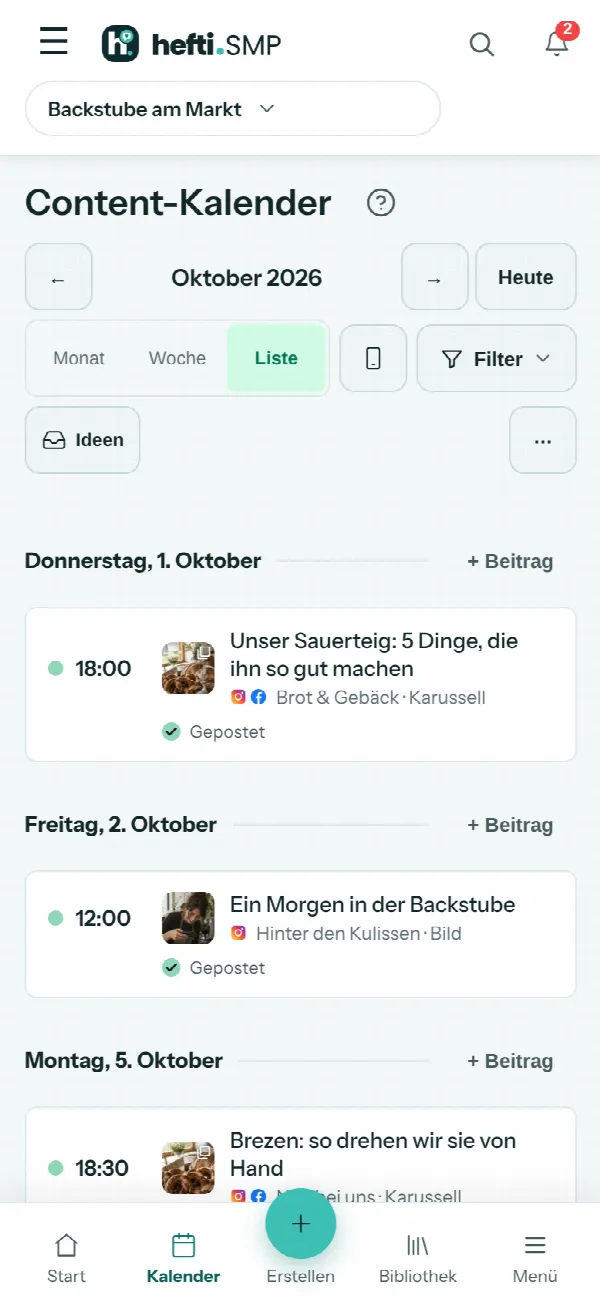
The content calendar in the planner with a planned month

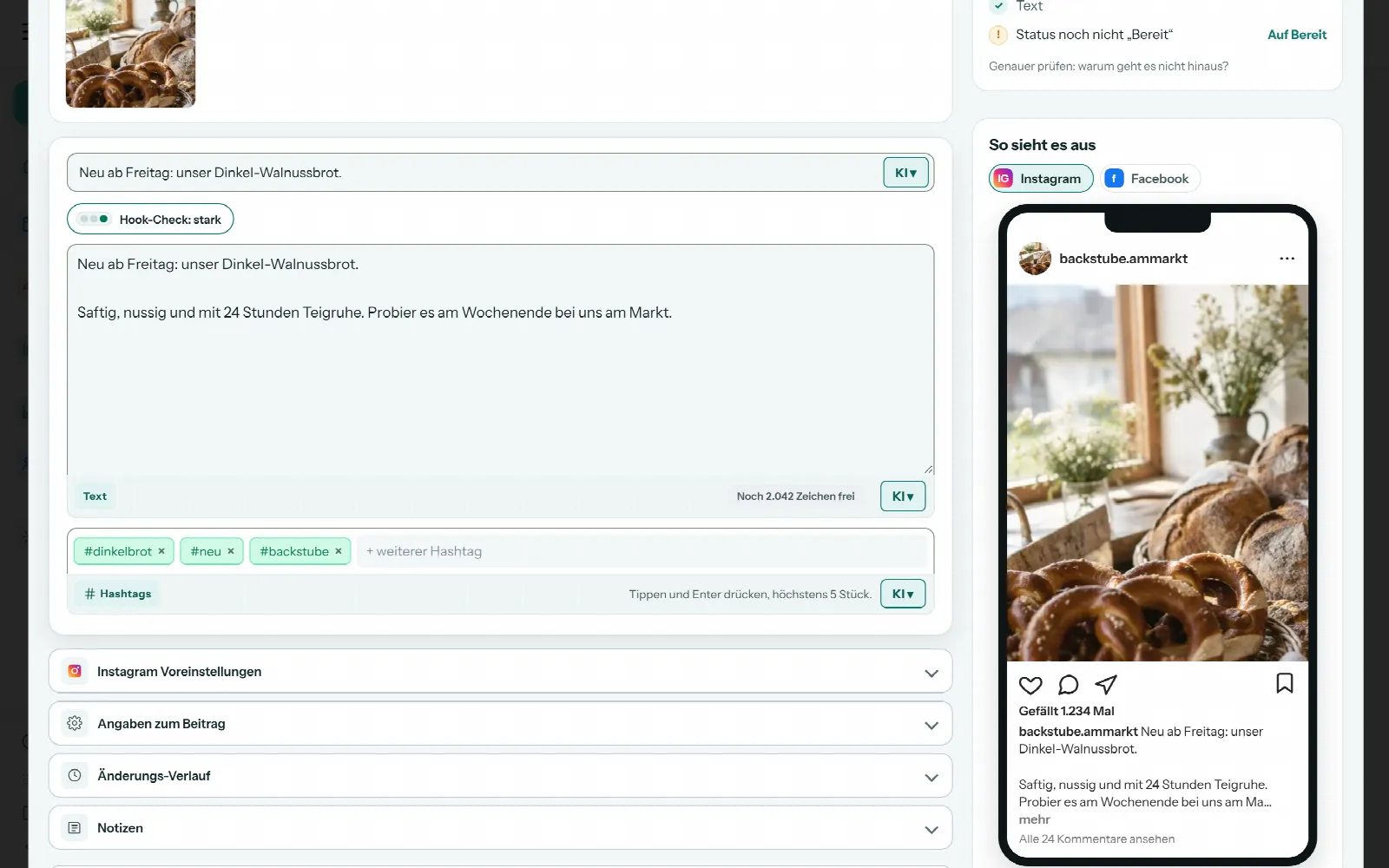
Copy that sounds like you.

The planner knows your brand voice. Hook, caption and hashtags are ready, you read through and say yes. On the right you see how it looks in the feed.

  • Just speak instead of typing
  • A link or a photo becomes a post
  • Old posts come back in a fresh look
A post in the planner with caption, hashtags and a preview like on Instagram

Carousels people love to swipe.

Pick photos, write one sentence. The planner makes the slides, in your colours and your font.

  • Text on images, with templates and layers
  • Images in your style, even without a photo
  • Connection to Canva, if you already design there
Slide 1 / 6 Slide 2 / 6 Slide 3 / 6 Slide 4 / 6 Slide 5 / 6 Slide 6 / 6
Coming soon

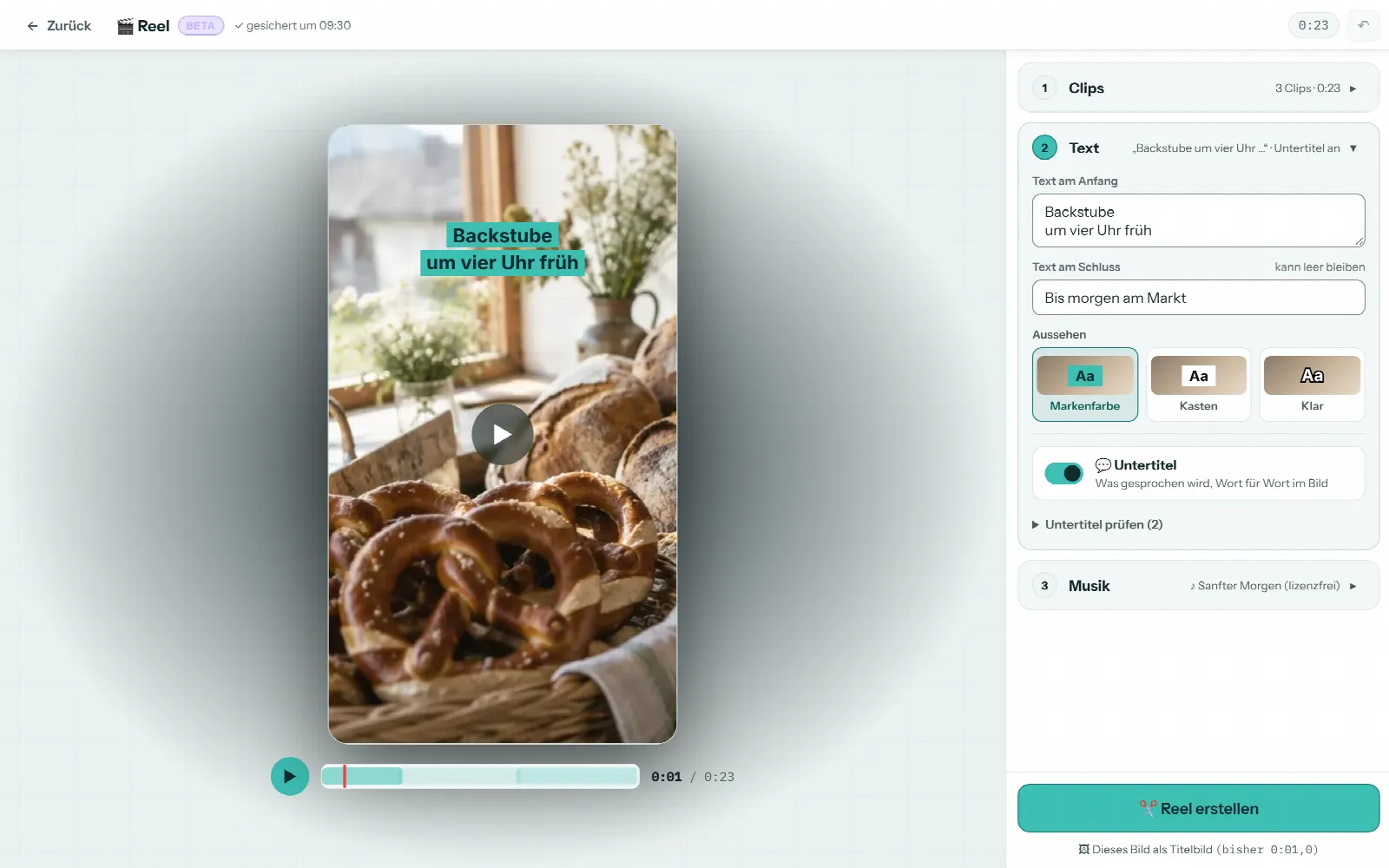
Edit reels, as easy as on your phone.

Add clips, drag the start and end, done. Subtitles, music and smooth transitions with one tap. The planner cuts out speaking pauses by itself.

  • Subtitles word by word, easy to follow
  • Music automatically gets quieter while someone speaks
  • Rendering happens in the background, you keep working
The reel editor in the planner with preview and clips

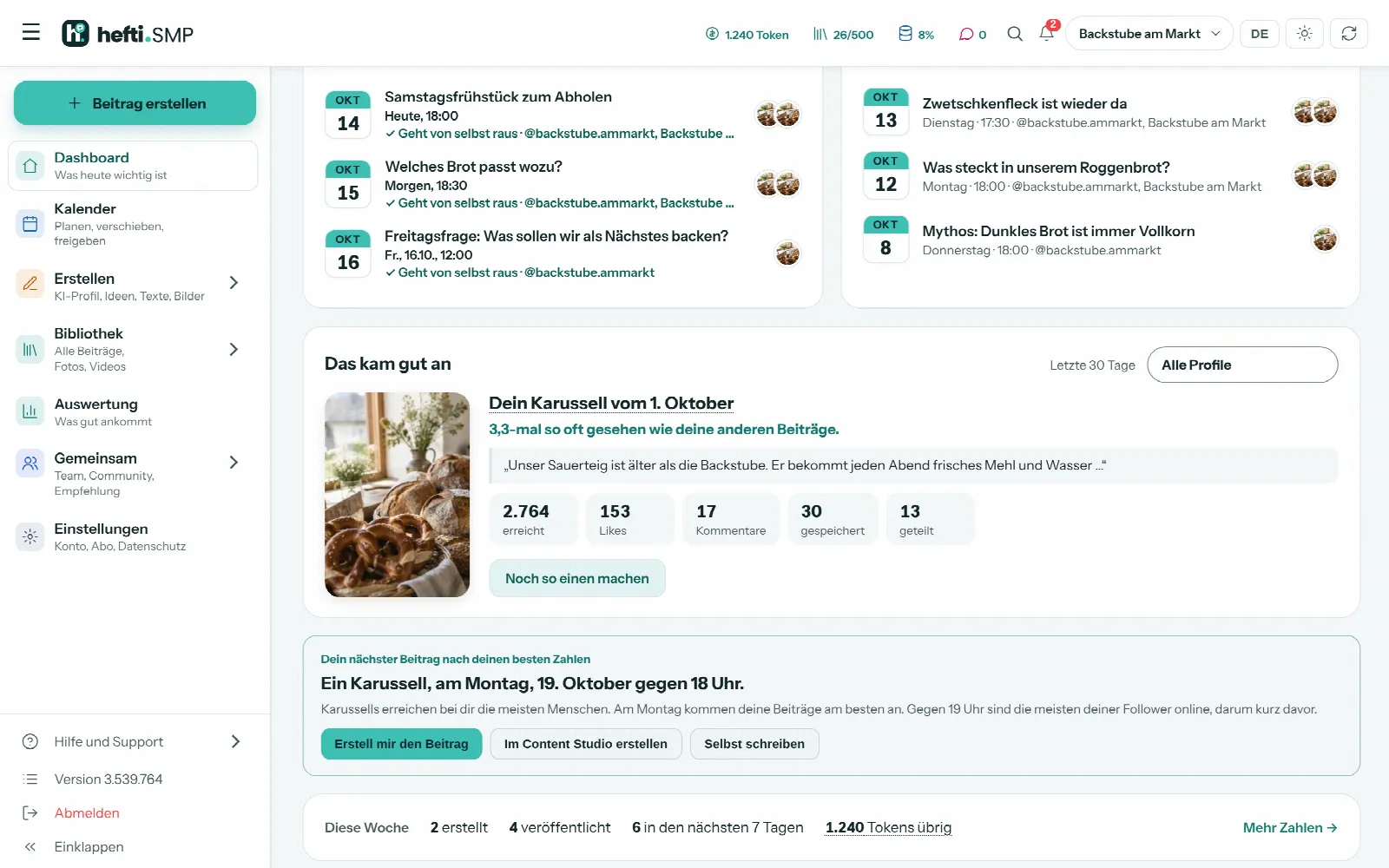
You see what works. And do more of it.

No spreadsheets, no jargon. The planner tells you in one sentence what landed well and suggests the next post based on exactly that.

  • Real numbers from Instagram and Facebook
  • Your best time to post, worked out for you
  • “Make another one like this” with one click
The insights in the planner show which post landed well

And that is far from everything.

Every tool solves a problem you know:

Idea generatorNever a blank page again
Content StudioStep by step to a finished post
Brand voiceSounds like you, not like a machine
Images in your styleEven without a photo of your own
Text on imageQuote tiles in seconds
Carousel workshopFinished slides from one sentence
Reel script and shot listNever stuck in front of the camera again
Monthly plannerA whole month with one click
Content calendarEverything in view, nothing forgotten
Posts on its ownAt the best time, without you lifting a finger
Post checkYou know in advance whether it will land
Real numbersFrom Instagram and Facebook, simply explained
Hashtags with real numbersThe right ones instead of random ones
StoriesPlanned right along
Team and approval linksClients approve with one click
Referral programmeRecommending pays off

And many more features that make your day easier. View all features →

This is what the planner looks like

Take a good look around before you start.

Real screens from the planner, with the sample account of a small bakery. Tap a picture to see it large.

With ChatGPT, Claude & co.

Your planner talks to your AI.

Already using Claude or ChatGPT? Then connect it to your planner. You tell the AI what you need in your own words, and the finished draft is waiting in your planner. No copying and pasting.

  • Claude
  • ChatGPT
  • other AI assistants
Your AI assistante.g. Claude or ChatGPT connected to your planner

Turn these three photos into a carousel post for next Tuesday.

Sure! I uploaded the photos to your media library, wrote the caption in your voice and put everything into your planner as a draft for Tuesday, 6 pm.

Draft created in your plannerCarousel · 3 photos · Tue, 6:00 pm
Your plannerCalendar
Carousel · 6:00 pm🤖 Draft from your AI
  1. Connect once

    You add your planner to Claude or ChatGPT as a connection, sign in and tick which accounts the AI may see. A guide shows you every click.

    about 3 minutes, just once
  2. Say what you need

    Just like you would tell a colleague. From your planner, the AI knows your voice, your topics and your channels. Attach photos, pull them from Google Drive or Dropbox, or upload them from your phone via a link.

    in your own words
  3. Check and approve

    The draft sits in your planner marked with 🤖. You read it, change whatever you like and approve it. Or you let the AI schedule it right away.

    exactly the way you want

You decide what the AI may do.

  • Tick each permissionRead posts, read the AI profile, media library, upload images, create drafts, schedule for posting: you tick what fits for each connection.
  • Your accounts, your choiceYou decide which social media accounts and AI profiles the AI may see and post to.
  • From draft to schedulingAt first it only creates drafts and you approve them. Want more speed? Let it schedule posts too.
  • Change it any timeAdjust permissions whenever you like or disconnect with one click. The AI never gets your password.

The connection uses MCP, the open standard that lets AI assistants talk safely to other apps. In Claude you add it under “Connectors”, in ChatGPT, depending on your plan, in developer mode. Other AI assistants work if they allow their own MCP connections.

For You

Everyone ticks differently. Your planner gets you.

Some want results, some want ideas, some want security and some want order. Where do you see yourself?

Master carpenter glancing at his phone, satisfied
The doer

You want results.

No trial and error. You want to see that it works, and fast.

  • A finished post in a few minutes
  • Posts by itself, without you having to remember
  • Clear numbers instead of gut feeling
Café owner laughing as she films latte art
The idea person

You have a thousand ideas.

Just no time to make them all happen. Here every idea turns into something, and it is fun.

  • Just speak your ideas
  • Reels, carousels and images in no time
  • Fresh ideas whenever you run out
Physiotherapist relaxing by the window with a cup of tea
The calm one

You want to take it calmly.

Step by step, without tech jargon. You can’t break anything.

  • Guides with pictures that take you by the hand
  • Real people help you when you ask
  • Nothing goes out before you say yes
Tax advisor planning at a tidy desk
The precise one

You want to know exactly.

Structure, overview and traceability. Everything is planned, every number explained.

  • Calendar, content pillars and approvals
  • Servers in Germany, export and deletion at any time
  • Transparent plans, everything visible before you buy
Woman enjoying the sun on her balcony on a Sunday morning, phone face down
Imagine …

It is Sunday morning. The coffee is warm, your phone lies face down on the table. And still, tomorrow at 6 pm your post goes out, exactly the way you wanted it. The whole week is set. You feel how light that is.

That is exactly what the planner is for.

Start today
What you save

Less work. More life.

In minutes

for a finished post with text, image and hashtags. The AI writes the first draft, you just adjust it.

More time

every month, the more posts you plan. Time for your customers, your family or simply yourself.

0 €

to get started. No credit card, no subscription, no risk.

For teams and agencies

Approve instead of emailing back and forth.

You manage several brands or work in a team? Everyone gets their role, clients approve via a link, and nobody asks “Which version is the right one?” anymore

Own rolesEveryone sees only what they need
Internal approvalFour eyes before anything goes out
Share linksFor clients, without their own account
commentsFeedback right on the post
A small team approves a post on a tablet
Voices

Here's what people who are already on board say.

★★★★★★★★★★ 4.9 basierend auf 10 Kundenbewertungen
★★★★★

„Mit nur ein paar wenigen Eingaben habe ich einen schönen und hochwertigen Beitrag erstellt. Ich kann die Beiträge sehr individuell erstellen oder mich doch auf die Ideen die mir vorgeschlagen werden verlassen. Ich spare jede Woche unmengen an Zeit. Und sollte etwas nicht sofort klappen… “

M
Madeleine
★★★★★

„eine einfach und super easy Lösung um Content zu erstellen, zu planen und automatisch zu veröffentlichen. Ich liebe es.“

MA
Matthias Abler
★★★★★

„War am Anfang schon sehr gut, aber wächst immer weiter. Inzwischen sind wir nicht mehr am testen sondern am Finetuning und das geht echt gut. dürfte bald ein alltägliches Werkzeug werden :-). Ein Dank an die creativen Heftis“

FW
Foto Winder
★★★★★

„Mir gefällt das die KI mir beim Content schreiben hilft und ich nur noch das Video oder das Bild hochladen muss. Es geht so schnell und ich muss mir nicht mehr den Kopf darüber zerbrechen was ich jetzt so schreiben könnte. Bei mir klappt es… “

O
OlgaVermarktung von selbst erstellten Büchern
★★★★★

„Die ersten Gehversuche im Planer waren super. Total easy in der Einrichtung und Ultra leicht zu verstehen. Ein echter Gamechanger.“

P
PeterTierheilpraktiker / Networker / Creator
★★★★★

„Der Smarter Social Media Planer ist sehr praktisch, es erleichert einen die Arbeit. Und die Zeit, die man für den Content-Erstellung brauch wird dadurch abgenommen. Es erstellt sehr passende Hooks und falls man da was verändern möchte, kann man es auch direkt der KI sagen.… “

M
Monika
★★★★★

„Danke für dieses tolle Tool! Ich bin wirklich begeistert!! Sowohl die Anmeldung als auch die Anwendung sind angenehm und intuitiv. Ich habe mich sofort zurechtgefunden und konnte direkt loslegen. Die Ergebnisse werden schnell erstellt und lassen sich bei Bedarf ganz einfach anpassen oder weiterbearbeiten. Das… “

EG
Elizabeth G.Coach
★★★★☆

„Vom Aufbau, von der Idee her ein super Tool.Und das sag ich als IT´ler. Es hapert nur noch an den Feinheiten. Allerdings die Basis, die Idee, das Grundkonstrukt, die Auswahl der Funktionen und deren Aufmachung sind richtig gut.“

MS
Mike SchmittCoach
★★★★★

„"Der Smarte Social Media Planer hat unsere Arbeit komplett verändert!" Pascal und Maria haben mit dem Smarten Social Media Planer genau das entwickelt, wonach wir schon seit Jahren gesucht haben – und ehrlich gesagt nie gefunden haben. Früher haben wir viel Zeit damit verbracht, zu… “

MG
Marika und GeorgGeMa Bodyworks - Naturheilpraxis
The story behind it

Made by people. For people.

Warum wir den Smarten Planer entwickelt haben

Nach über 12 Jahren im Marketing und mehr als 1.000 begleiteten Kundenprojekten hörten wir immer wieder dieselbe Frage:

„Was soll ich eigentlich posten?“

Nicht weil es an Motivation fehlte.

Nicht weil die Menschen keine Ahnung von ihrem Geschäft hatten.

Und auch nicht, weil sie keine Ideen hatten.

Sondern weil zwischen einer Idee und einem fertigen Beitrag unglaublich viele kleine Entscheidungen liegen.

Welches Thema?
Welches Format?
Welche Hook?
Welcher Aufbau?
Welche Caption?
Welcher Call-to-Action?

Genau diese Denk-Arbeit sorgt dafür, dass Social Media immer wieder auf morgen verschoben wird.

Wir kennen das nicht nur von unseren Kunden.
Wir kennen es auch von uns selbst.

Deshalb haben wir keinen weiteren KI-Chat gebaut, der einfach nur mehr Ideen ausspuckt.

Wir wollten ein Werkzeug entwickeln, das Menschen Schritt für Schritt durch den gesamten Prozess führt, Entscheidungen vereinfacht und aus einer einzelnen Idee echten Content entstehen lässt.

Der Smarte Planer soll nicht mehr Arbeit erzeugen.

Er soll Marketing einfacher machen.

Damit du weniger Zeit mit Grübeln verbringst und mehr Zeit für das hast, was dein Unternehmen wirklich voranbringt.

Denn Sichtbarkeit sollte kein Vollzeitjob sein.
Where we're headed

Planned & already shipped

We're constantly improving hefti.SMP , driven by real user requests. Switch between what we've already shipped, what we're working on right now and what's coming next:

✅ Shipped

Caption dichtet vieles dazu und macht es zu viel auf die Voreinstellungen

✅ Shipped

Verbindung mit TikTok

✅ Shipped

Individuelles Titelbild für Reels auswählen

✅ Shipped

Menüleiste link anpassbar verschiebbar und anpinnbar machen

✅ Shipped

Wenn ich im Kalender bin als Widget und nicht als neues fenster, damit ich auf dem Kalender bleibe

✅ Shipped

Fotos und Videos in einem Beitrag kombinieren

✅ Shipped

Orte direkt in Facebook- und Instagram-Posts einfügen

✅ Shipped

Zusätzliche Dokumente beim Profil anlegen hochladen

✅ Shipped

Vorschau für alle Geräte und Social-Media-Konten

✅ Shipped

Link zu externen Social Media Posts beim Content Recycling

✅ Shipped

Verbindung Instgram und Facebook

✅ Shipped

Dynamische Sichtbarkeit von Kanban-Spalten

Frequently asked questions

Questions we get asked all the time.

Is it really free?
The trial is completely free and requires no credit card, so you can take your time exploring. If you want to keep going afterwards, you pick a plan that suits you. There are no costs before that and nothing happens automatically.
Do I need technical know-how?
No. The planner asks you a few simple questions, sets everything up for you and guides you step by step. If you can type or talk, you can do this.
Does it really sound like me?
Yes. hefti.SMP learns your brand voice, your topics and your style. The copy sounds like you, not like a machine, and you can polish it yourself at any time.
Can something go out that I don’t want?
No. A post only goes out once you set it to “Ready”. An AI you connect (for example Claude or ChatGPT) may only do that if you explicitly allow it. Until then everything is a draft. Only you, your team, helpers and AI you give access to, anyone with your approval link, and our support (to help you) can see it. Every support visit is logged with a reason, and you can switch it off.
What happens with my data?
Your data belongs to you. hefti.SMP runs on servers in Germany. You can export your data or delete your account completely at any time. We do not sell anything on. For the AI features your input goes to AI providers, the privacy policy explains exactly how.
Which platforms can I post to?
Directly on Facebook, Instagram, TikTok, LinkedIn, Google Unternehmensprofil, Pinterest, YouTube Shorts und Threads. You plan everything in one place and keep track of all channels.
Can I cancel anytime?
Depending on the plan you cancel monthly or a minimum term applies. You see clearly what applies to your plan when choosing it, before you decide. You can cancel online at any time, even without logging in, via “Cancel contracts here” at the bottom of the page.
Will my price stay the same later on?
We only raise your price with advance notice, and you can then cancel free of charge. If you switch plans later, you can only switch to a plan available at that time, at the prices valid then.

📬 By signing up you will receive tips about hefti.SMP by e-mail, and you can unsubscribe at any time in the settings.

How do you use hefti.SMP?

🌱 Just getting started? A warm welcome, hefti.SMP is for you too.

hefti.SMP is meant for professional use, not for private hobby accounts.

Already have an account? Sign in

Want more later? Fair plans start from €9.99/month, with more tokens, all AI tools & full planning depending on the tier. But no pressure: you decide in your own time, whenever you're ready.

🔒 Fair prices: We only raise your price with advance notice, and you can then cancel free of charge. Later switches are only possible to plans available at that time, at the prices valid then.

🎁 Start for free 💳 No credit card 📋 Transparent plans 🔒 Servers in Germany

Together we make you visible.

More time for your customers. More people who find you. And a good feeling, every Monday.

10 days free trial · no credit card needed